


ATI TEAS Exam Prep 2026
4.737.00 Reviews
App Specs
- Version
- 2.1.030
- Updated On
- License
- Free
- Downloads
- 10,000+
- Developer
- Prepia Inc
- Categories
- Education
- Platform
- Android
Screenshots
 Analysis by AppCompare
I’d treat ATI TEAS Exam Prep 2026 as a focused practice companion, not a complete replacement for a course, textbook, or official exam guidance. Its main value is the chance to work through nursing-admissions questions, check why an answer is right or wrong, and use that feedback to decide what to revisit. That makes it most useful when you already have a study routine and need more structured practice, rather than when you’re looking for someone to teach every subject from the ground up.
A practical way to turn practice into a study routine
For TEAS preparation, having questions is only the first step. The more useful habit is to turn each missed answer into a small lesson: identify the concept you misunderstood, read the explanation carefully, then return to that topic later instead of immediately rushing through another quiz. I find this approach more valuable than chasing a high practice score, because a score by itself does not show whether you can explain the reasoning.
A realistic routine might be a short session during a commute or between other responsibilities, followed by a longer review at home. I would use the brief session to answer a manageable set of questions and mark the topics that caused hesitation. Later, I’d spend the longer block reviewing those explanations and studying the relevant material in more depth. This keeps the app’s practice from becoming a stream of taps with little learning attached.
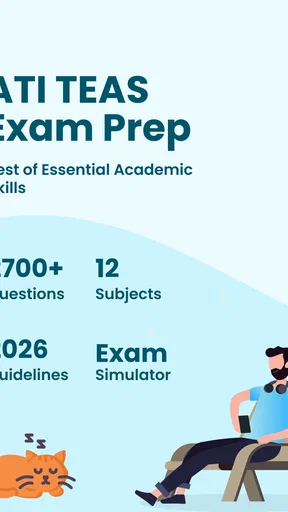
The app is an education product from Prepia Inc, and its focus is specifically ATI TEAS preparation. It includes around 1,900 practice questions, along with tests and study guides. That breadth gives you options for changing the format of a session: use questions for quick recall, a test when you want a more sustained challenge, and a guide when you need to revisit a subject. I would still check that your study plan covers the topics and expectations relevant to your own exam preparation.
What the explanations can—and cannot—do
Explanations are most helpful when I treat them as a starting point rather than a guarantee that I have mastered a concept. If I miss a science question, for example, I’d note whether the problem was unfamiliar vocabulary, a misunderstanding of the underlying idea, or a careless reading mistake. Those are different problems and call for different next steps. Repeating similar questions may help with recall, but it will not always fix a gap in foundational understanding.
This distinction matters especially for math. A correct answer can come from guessing or from applying a method correctly, and those outcomes are not the same. I’d work through the reasoning myself before looking at an explanation, then check whether my method was sound. If I can’t reproduce the steps without help, I’d use a separate lesson or textbook to rebuild that skill and return to the app afterward for practice.
The same approach helps with reading and English. When I miss a question, I’d look for the exact point where my interpretation diverged: did I overlook a detail, infer more than the passage supports, or misunderstand a grammar rule? Keeping a simple note of those patterns can make later practice more purposeful. It is a low-effort way to get more from a question bank without assuming the app’s score alone tells the whole story.
Worth Reading Before You Choose

Flipboard Shows What News Apps Must Do Beyond the Feed

Switching to Android Auto Means Rethinking Your Driving Routine

Google Calendar Makes a Crowded Week Easier to Manage

Ludo King Makes the Most of the Minutes Between Plans

Baby Panda World Brings Quick Play to Modern Phones, but Its Game Library Feels Busy

ESPN’s Live Game View Makes Following Close Games Easier
First Impressions and Interface
Upon downloading ATI TEAS Exam Prep 2026, I was pleasantly surprised by how clean and intuitive the interface is. It's got this sleek look that doesn’t distract you with unnecessary bells and whistles. Everything you need is just a tap away, and it’s super easy to navigate through the different sections like practice tests, study guides, and progress tracking. It’s like they knew exactly what we needed — simplicity and functionality.
Content and Features
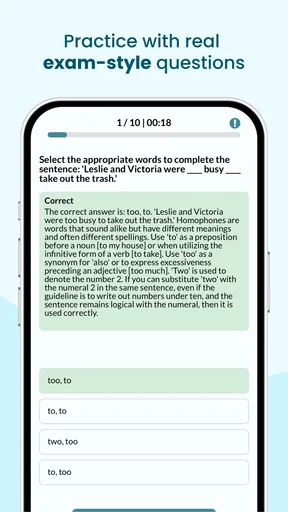
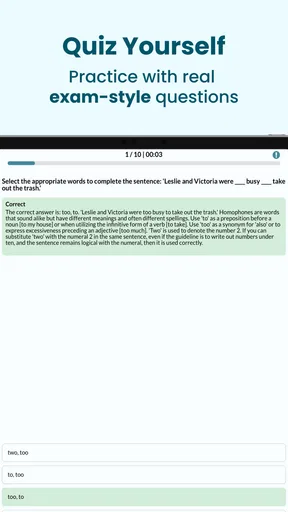
Now, onto the juicy stuff — the content. The app offers a wide range of practice questions covering all the sections of the TEAS exam: Reading, Math, Science, and English. Each section is packed with questions that mimic the actual exam format, so you feel like you’re in the hot seat right from your couch.
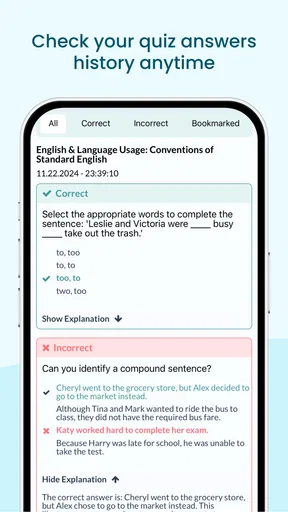
One of the features I really appreciated was the detailed explanations for each question. You don't just get a "right" or "wrong" — the app actually breaks down the reasoning behind each answer. This is a game-changer for those tricky questions where you might find yourself scratching your head.
Personalized Study Plan
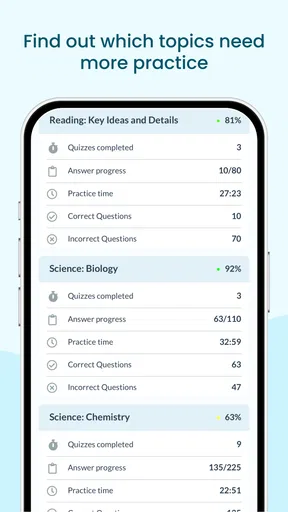
What’s even cooler is the personalized study plan feature. After you take a few practice tests, the app analyzes your performance and tailors a study plan just for you. It’s like having a personal tutor in your pocket. You get recommendations on which areas to focus on, making your study sessions more efficient and targeted.
I’d use those recommendations as a guide, not as a complete diagnosis of what I know. A low result in one area can point to a topic worth reviewing, but I would also consider whether I was tired, rushed, or unfamiliar with the question style that day. Before changing my whole schedule, I’d take another focused set of questions on the same subject and see whether the pattern holds. That small check can prevent one difficult session from steering all my study time in the wrong direction.
Progress and Motivation
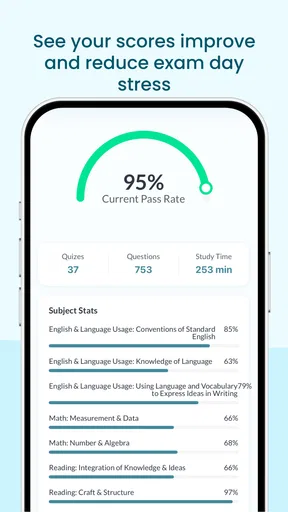
Keeping track of your progress is a breeze with this app. There’s a section where you can see your scores over time, which is super motivating. Watching that graph trend upwards feels pretty satisfying, and it encourages you to keep pushing forward. Plus, the app sends you little motivational nudges to keep you going when you’re slacking — a nice touch for those lazy days.
Progress tracking is most useful when I compare like with like. A score from a quick topic drill and a score from a broader test may not mean the same thing, so I’d avoid treating every change as proof that my readiness has improved or slipped. I’d pay closer attention to repeated trouble spots and whether I can explain the answers I once missed. That gives a more meaningful picture than simply trying to make the graph rise.
Accessibility and Convenience
Since the app is available on both Android and iOS, you can study pretty much anywhere. Whether you’re on the bus, waiting in line, or chilling at home, you’ve got your TEAS prep at your fingertips. And if you’re someone who likes to study on the go, this is a major plus!
Another thing I loved is that the app doesn’t require an internet connection for most of its features. You can download study materials and quizzes to access offline, which is perfect for those moments when Wi-Fi is nowhere to be found.
That flexibility is convenient, but I’d make offline access part of the routine rather than assume every study item will be ready wherever I am. Before leaving home, I’d open the materials I plan to use and confirm they’re available. It also helps to reserve the most demanding work for a place where I can concentrate; a noisy wait or a crowded ride is better suited to a few questions than to careful review of a difficult explanation.
How it fits beside other TEAS study options
Compared with a textbook, this app is easier to dip into for a short practice session and can make it simpler to spot recurring weak areas. A textbook or structured course is usually a better fit when you need a full explanation of a topic, a carefully sequenced lesson, or a broader teaching plan. I would pair the app with those resources if I were starting with major gaps, rather than expect a question bank to teach every concept in the right order.
It also differs from informal free quizzes scattered across the web. A focused collection with tests, guides, and explanations can make preparation feel less fragmented, while random quizzes may be handy for a quick check but harder to turn into a consistent plan. The trade-off is that an app-based practice routine can tempt you to keep answering questions without doing the slower review that leads to understanding. I’d choose the format based on the job: app questions for repeated practice, and a book, instructor, or class when I need deeper teaching or feedback on a confusing subject.
Who should use it, and what to weigh first
I think this app suits applicants who want flexible TEAS practice and are willing to learn from mistakes, especially people fitting study around work, classes, family responsibilities, or a long commute. It can also help someone who has already studied the basics and wants to identify which areas deserve another pass. With a 4.7 average from around 400 ratings and over 10K installs, it has attracted a substantial group of learners, though those figures can’t tell you whether its teaching style will suit your needs.
I’d be more cautious if you need a full course with live instruction, extensive foundational lessons, or personal feedback on every step of a problem. In that case, a class, tutor, or detailed textbook may be a better primary resource, with the app used for extra practice. It is also worth knowing that the download is free while in-app purchases range from $7.99 to $59.99 per item. I’d check what is accessible before building a plan around particular materials, and decide whether any paid option fits my budget and study needs.
The app is rated for Everyone, and its current version is 2.0.24, with Android support beginning at version 7.0. Those details make it easier to judge basic suitability for a device and household, but they do not replace checking that your phone runs comfortably or that the content aligns with your own preparation goals. Its release was on Nov 28, 2024, so I’d also make a habit of checking the app itself for current materials before relying on it as my only study source.
Overall Experience
All in all, my experience with the ATI TEAS Exam Prep 2026 app has been pretty positive. It’s got a great balance of comprehensive content and user-friendly design. Whether you're just starting your TEAS journey or looking to refine your skills, this app can definitely help you get there.
If you’re looking to streamline your study process and need something that offers solid content, personalized plans, and the flexibility to study anywhere, give this app a try. It might just be the tool you need to ace that exam. Happy studying!
My recommendation is to start with a clear purpose for each session: learn a weak topic, practise a particular skill, or check how you handle a longer set of questions. That makes it easier to judge whether the app is helping rather than simply keeping you busy. I’d also avoid using a single practice result as a prediction of exam-day performance; steady understanding across topics matters more than one encouraging score.
For me, the strongest case for trying it is its combination of question practice, explanations, study guides, and progress feedback in a format that can fit around a busy day. Its main limitation is the same one many prep apps share: practice tools work best when you already know how to follow up on confusion, and they cannot replace every kind of teaching. If you want a focused companion and can pair it with deeper study when needed, it is a sensible option. If you need a teacher-led course from the beginning, I’d choose that first and use this as a supplement.
Pros
- Comprehensive practice tests included.
- User-friendly interface for easy navigation.
- Detailed explanations for each answer.
- Offline access to study materials.
- Customizable study plans available.
Cons
- Limited free content before purchase.
- No interactive community features.
- Occasional app crashes reported.
- Requires internet for updates.
- Ads present in the free version.
FAQs for ATI TEAS Exam Prep 2026
What features does the ATI TEAS Exam Prep 2026 app offer?
The ATI TEAS Exam Prep 2026 app provides a comprehensive suite of features designed to help users prepare effectively. It includes practice tests, detailed explanations, and performance tracking. The app also offers customizable study plans, flashcards, and a timed quiz mode to simulate the actual exam environment, ensuring thorough preparation.
Is the ATI TEAS Exam Prep 2026 app suitable for all skill levels?
Yes, the app is designed to cater to users of all skill levels. Whether you're just starting your preparation or looking to refine your knowledge, the app's adaptive learning technology adjusts to your proficiency, offering personalized recommendations based on your performance to maximize study efficiency.
Can I access the ATI TEAS Exam Prep 2026 app offline?
While some features of the ATI TEAS Exam Prep 2026 app require an internet connection, such as downloading new content or updates, many resources, including practice questions and flashcards, are available offline. This allows users to study anytime, anywhere, without worrying about connectivity issues.
Does the ATI TEAS Exam Prep 2026 app offer any support or guidance?
Yes, the app provides robust support and guidance. Users can access detailed explanations for each practice question and explore a comprehensive knowledge base for additional understanding. The app also includes a community forum where users can interact, share tips, and seek advice from other learners.
How does the performance tracking feature work in the app?
The performance tracking feature in the ATI TEAS Exam Prep 2026 app allows users to monitor their progress over time. It provides detailed analytics on test results, highlighting strengths and areas needing improvement. This feedback helps users tailor their study approach and focus on topics that require more attention.


